Posts

Showing posts with the label Core

What is new in .NET 5?

On November 10, 2020, just 5 minutes before the start of the annual online conference .NET Conf 2020, the .NET 5 download page was updated. What the .NET developers all over the world have been waiting for has come true. No surprise happened - all innovations and improvements were known long before that moment. We saw .NET 5 RC1 and RC2 earlier in September and October 2020. Many developers have already tried .NET 5 in their projects. However, the moment of release of .NET 5 summed up the huge work that Microsoft developers have done together with many authors of the open source community . Shortly after the official release of .NET 5, Visual Studio 2019 update 16.8 was released with full support for all features of the new framework. Docker images for .NET 5 and .NET 5 SDK have also been published. What did we get with the .NET 5 release? First of all it is the consolidation of frameworks - now instead of separate Core, Mono, Xamarin we have a single .net5.0 target. In fact, the .n...

How-to rebuild the libgdiplus library

Image
Sometimes it can be incorrect to display Unicode texts when saved in images or in PDF when running FastReport Open Source on Linux.  One of the most common problems is the error of hyphenation in a sentence and, as a result, the wrong interval between words. For example, when using the Thai language in Windows, we see this text: When running the same report in Linux Ubuntu you can see that the string is formatted incorrectly: There may also be problems with word wrap. Another example with the Thai language in the Windows operating system: The same text in the Linux operating system Ubuntu does not look correct: Similar errors may occur in other languages. Fortunately, there is a solution to the problem described above - building the libgdiplus library from sources with the with-pango key. Before you begin, it is strongly recommended to back up the /usr/lib/libgdiplus*.* files, as they will be overwritten with new files in the process. In this case you can return the system to its ...

Report script security

Image
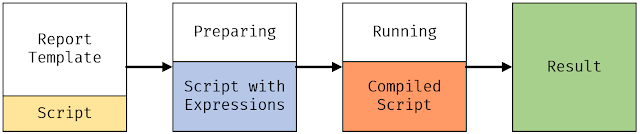
FastReport Open Source supports calculation of expressions for displaying values in the desired form, or any object visibility conditions. It is also possible to process events for each object of the report, e.g., before printing it. Event handlers are placed in a report script that supports C # and VB.NET languages. In addition to processing events, the script can contain almost any calculations or actions that can generate the necessary data or change the report behavior, as is required by the developer of the report template. Before building the program in the report script language, the report generator takes into account all expressions, functions, and calls to parameters in the report. Then the program is combined with the script that the report template developer had written. The resulting script is compiled and loaded as a library into the application that works with the report generator. When you run reports in web applications, you can edit them using the Online Designer . E...

How to create PDF on Raspberry PI with .NET Core 3.1

Image
Raspberry PI is a miniature single-board computer with ARM processor. This microcomputer is often used as an educational platform or for development of embedded solutions. For our experiments we use the Raspberry PI 3B board with 1GB of RAM and the installed Linux Raspbian Buster with desktop operating system. I will omit the installation and configuration of the system - we will assume that everything is already installed and working for you. Despite the tiny size, we are using a computer with powerful  capabilities. Let's try to install the .NET Core framework on it and write a simple C # application that will generate a PDF document. Firstly, we need to connect to the Raspberry via SSH or open the terminal application on the desktop if you connected the board to the monitors and keyboard. Of course, the board must be connected to the Internet to install the components we need.   The Raspbian operating system supports the execution of .NET Core applications for the ARM32 arc...

How to use FastReport Open Source in ASP.NET Core Web API application

Image
ASP.Net Core allows you to create Web API applications as well as the usual ASP.Net. Such Restful Web API applications are extremely popular right now. Therefore, it would be nice to learn how to use FastReport for distribution via the API reports. In this article, we will create a demo WebAPI application that allows you to download or view reports in two formats: html and png. 

How to use data source in FastReport Open Source reports

Image
When you create a web report for FastReport Open Source, you use a database to construct a template. You create an internal connection to the data source and add table fields to the report page. But, when the report is used in real conditions, the database specified in the internal connection may not be available. And then you will see such kind of error.

FastReport Open Source - what is it and how to use it

Image
Open Source is very popular in our time. The global giants of the software market played considerable role in its popularization. After all, these companies are developing high-end commercial software, and their open source projects are based on proven solutions and best practices. And development is lead by professional programmers. All this increases the credibility of such open source projects. No, I do not want to say that projects created by a community of like-minded people are worse. Often they turn into cult, for example, the well-known Linux. However, such projects often attract inexperienced developers eager to gain new experience, which affects the quality of the product. Anyway, more and more commercially successful software companies are trying to benefit the public, creating open source projects. FastReports has not become an exception. One of its most successful projects, the FastReport .NET report generator, is now open source. To tell the truth , this is not a f...